-1.png?width=640&height=400&name=Opt%20in%20to%20Text%20Alerts%20%26%20EventPay%20Images%20%26%20Refer%20a%20FRiend%20(1)-1.png)
Curious how payments work once you're booked on The Bash? EventPay is The Bash's secure online payment system that makes accepting payments from your clients quick and easy. While it's optional, EventPay is free for vendors to use and convenient for both you and clients. If you're not enrolled yet or have questions about how you actually collect payments once you're booked on The Bash, this article covers everything you need to know.
Overview of How Payments Work
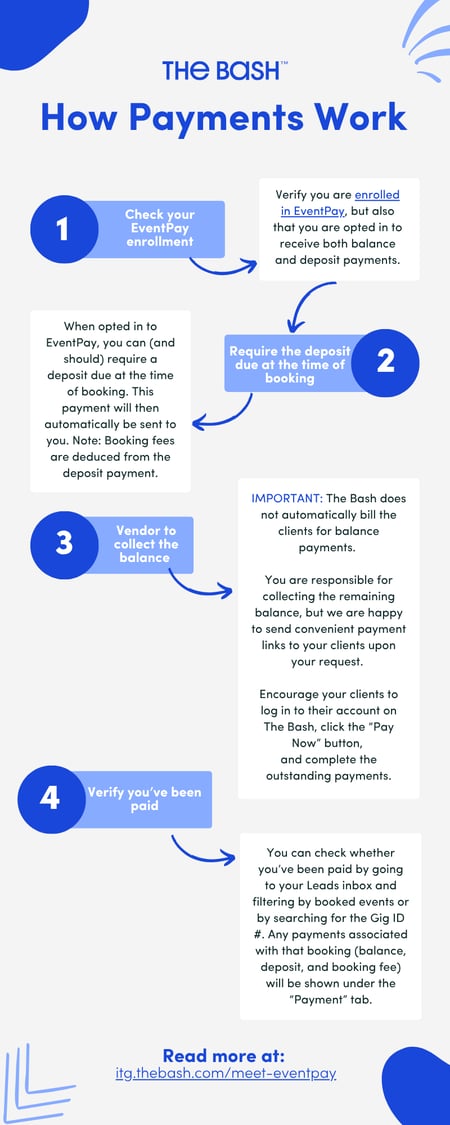
1. Enroll in EventPay
First things first: Enroll in our online payment system, EventPay so you can easily and quickly get paid for your bookings. It is optional, but it's free to use and a simple, secure way to get paid by clients.
EventPay is currently available to members located in the U.S. only. Payments typically reach your bank account in as fast as 2 business days. Learn more about EventPay here.
2. Ensure you're opted in to accept both deposit and balance payments
This is important! Ensure you are opted in to receive both deposit and balance payments because if you only selected deposit payments, your clients won't have the option to pay their remaining balance to you online through The Bash.
Check if you are enrolled in both deposit and balance payments here.
3. Collecting your deposit
When submitting a quote, you'll have the option to enter the deposit amount and edit when it's due. We highly recommend requiring the deposit to be due at the time of booking. You only have this option when enrolled in EventPay, and it will default to this setting if you are.
If you require a deposit due at the time of booking, the deposit will automatically be sent to you. Please note that the booking fee will be deducted from that deposit payment.
4. Collecting the remaining balance
⚠️ IMPORTANT: The Bash DOES NOT automatically bill your clients for remaining balance payments.
This is the #1 question we receive from vendors! You as the vendor are responsible for collecting the balance from your clients. This gives vendors full flexibility to collect final payments however they prefer—whether that's through EventPay, or directly via cash, check, Venmo, or another payment method.
You can encourage the client to log in to their account on The Bash, go to the booking, and click the "Pay Now" button to submit the balance payment. We are always happy to send convenient payment links directly to your client upon your request! Just reach out to us.
5. How to check if you've been paid
Want to verify if a deposit or balance payment has gone through on The Bash? You can check the status anytime in your account:
-
Go to your Leads Inbox.
-
Filter by Booked Events or search by the Gig ID #.
-
Click on the booking and go to the "Payment" tab.
-
All associated payments made through The Bash (deposit, remaining balance, and booking fee deductions) will be displayed clearly here.
If you have any questions, contact us anytime.
_
YOU MAY ALSO LIKE