.png?width=660&height=413&name=Lead%20Details%20%26%20Lead%20Response%20Redesign%20Blog%20Image%20(3).png) When responding to a lead on The Bash, your quote is more than a price—it’s your chance to show the value behind your services. A strong quote clearly communicates your rate, what’s included, and the details that help party planners understand why you’re the right fit for their event.
When responding to a lead on The Bash, your quote is more than a price—it’s your chance to show the value behind your services. A strong quote clearly communicates your rate, what’s included, and the details that help party planners understand why you’re the right fit for their event.
Below are key ways to customize your quote and make a strong first impression.
Key Ways to Customize Your Quote
Before you submit your quote on The Bash, review the full details of the request including the event type, venue, budget, service time, number of guests, and the planner’s message. Also, take note of whether the lead is a direct request (the planner specifically requested you) or an auto-add request (you were added on to the request because the planner wanted more quotes). This context can help you adjust your messaging and level of personalization when responding.
Once you're ready to respond, carefully review and complete each section of the lead response form before submitting your quote. These settings affect how your quote is presented to the planner and can play a key role in whether you secure the booking.
Rate

Your rate is a key part of your quote. The time period for your rate will default to the duration requested by the planner, but you can adjust this by clicking 'Edit.' For example, sometimes vendors are looking to enter their hourly price or set a minimum duration they provide services for.
In this section, you can also edit the number of vendors/performers if your rate involves more than one.
Use the personal message section to clarify what’s included in your rate, any minimums, package options, or current promotions.
Deposit Options
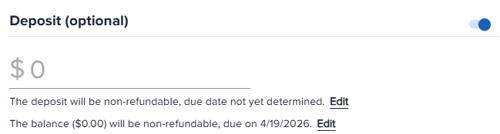
We always recommend requesting a deposit. Your quote will default to this option turned on. Most clients are willing to put money down to secure the date and it helps reassure them that the booking is official. Of course, deposits also protect the vendor (you) in the case of a cancellation.
If you are setting a deposit amount: Enter the deposit amount you are requesting. Your deposit will default to being 'non-refundable, due at the time of booking' if you are enrolled in EventPay. You must be enrolled in EventPay to be able to select this option. If you are not enrolled, this will default to 'not yet determined,' but you have the option to choose a specific date. Click the 'Edit' button to change the deposit due date and to select if you want the deposit to be refundable instead.
If you are not collecting a deposit: If you are not collecting a deposit, turn the deposit toggle off before submitting your quote. If that is on and you have not entered a deposit amount, the quote will not send.
Balance Options
Your balance payment will default to 'non-refundable' and 'due on the date of the event.' If you want to change this, click the 'Edit' button next to these details and adjust the terms.
Personal Message
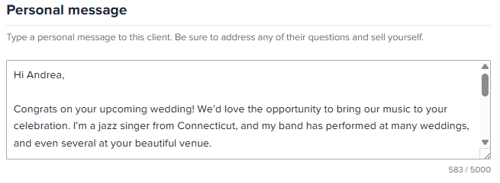
Your personal message is also a very important part of your quote and can impact whether you hear back from the planner.
Your message should be professional and more than just a sentence long. We typically see responses around 500–1,000 characters perform best.
You may want to include details like: A brief introduction of yourself and your business, your excitement for their event, relevant experience or past events, what makes you a strong fit for their event, clarification on any pricing/package details, and next steps. Be sure to personalize your message by using the planner's first name and reference their specific request—you want to make the best first impression.
Pro Tip: Saved responses can help make quoting faster and more consistent.
We have several articles with best practices for responding to and following up with leads:
Additional Charges
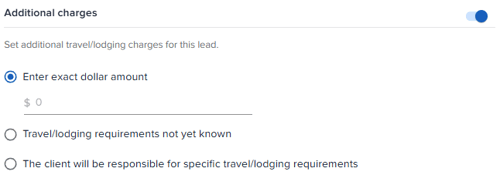
If your pricing does not automatically include travel or extra costs, you can add them directly in your quote in the 'Additional charges' section. You may choose to enter an exact dollar amount, select 'Travel/lodging requirements not yet known', or select specific travel/lodging requirements they are responsible for. Again, use your personal message to clarify if needed.
Breaks

You have the option to specify the number of breaks and length of those breaks, if needed.
Quote Expiration Date

Lastly, you have the option to set an expiration for your quote. Quotes expire at 12:00 AM ET on the chosen expiration date and planners will not be able to confirm bookings after that expiration date unless it's updated with a new expiration date.
What to Do After You Send Your Quote
Once submitted, the planner's contact information will become visible. We recommend following up within 24–48 hours via email or phone to increase your chances of booking.
If you would like to send a copy of your quote to your email address, you can also find this option under the 'More options' dropdown in the upper right corner of the lead details.
If you have any additional questions, don't hesitate to contact us.
_
YOU MAY ALSO LIKE
After the Quote Request: Why, When, & How to Follow up >
6 Things Party Planners Look For in a Vendor Quote >
Lifecycle of a Lead: From Requests to Bookings and Reviews >